Students,
When writing a new article, be sure to put it in a new page. Every blog builder has this button says "create new page"; click that button to write your new article. Most of you did the "updating thing" in which too far from writing a new issue. If still confused please do your part to do some research, there are a lot of tutorials you can find on the search engine, be resourceful enough, or ask your classmates how they have done the right thing. its just a matter of responsibility and effort.
When one is writing a new article in the same field or page it only means that you add a new information from the published article "that is the updating thing". But most of the blogger do not do this. What they mostly do is actually linking that article to other page which you can actually see this "click here" with underlined text when mouse-over/under-hooding.
As much as possible, re-edit your blog and create a new page. Let me explain the concept.
1. i.e: www.cocpage.blogspot.com this link is what we call - home page or landing page. What should be the contents in this page? are as follows.
Navigation bars = Home, archive , contact info, credits and about-blogger and more.
Body = Pictures, texts, advertisements. indexes and links.
Footer: Credits and copyright rules.
www.cocpage.blogspot.com/studyanteng-bungi.php - is the article under the page of "www.cocpage.blogspot.com"

Yours,
Braz,
SEE ILLUSTRATIONS BELOW to understand what is written above.
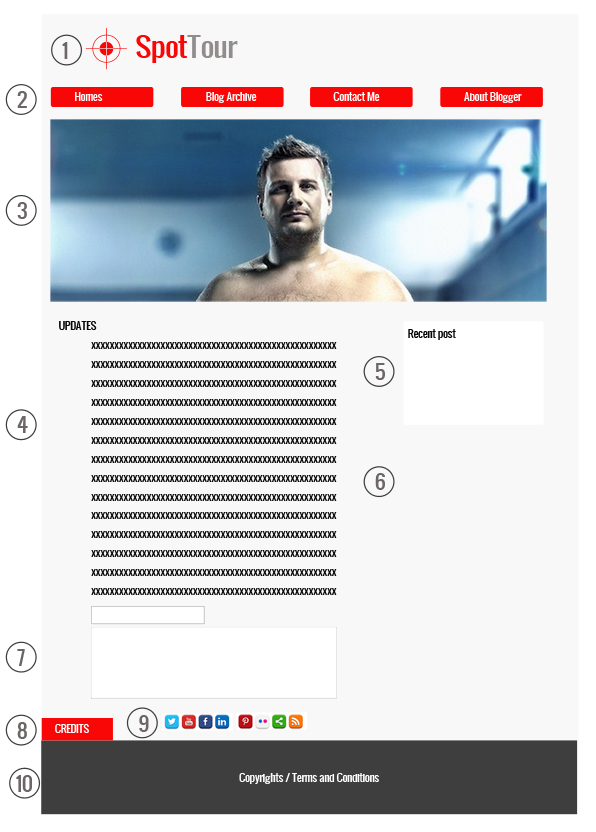
This is what the Homepage would look like.
1. Logo / Identity /(Branding) - If business/professional Blogger
2. Navigation Bars sometimes it has Drop-down Menu / Under-hood Buttons (Sometimes these are hidden when viewing articles from the blogger)
3. Slide-bar or Rolling Banner
4. Article Updates
5. Recent Post / Archive visible and clickable text
6. Space for Advertisements and Banners
7. Comment Box (Optional for Landing Page/Homepage)
8. Credits - Acknowledgements if using a downloadable images from search engine. Anything that is not originally own by the blogger. (Very important)
9. Social Media Sharing Buttons
10. Footer / Terms and Policies,
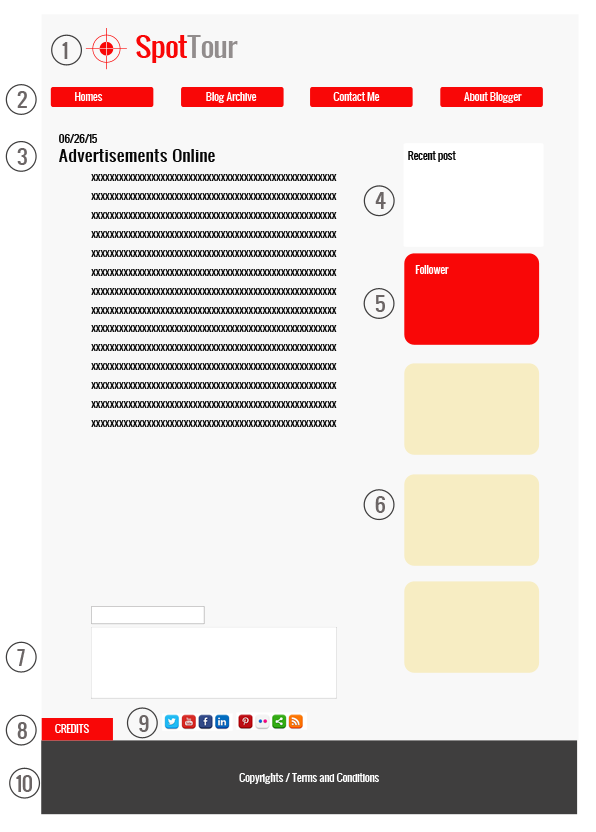
This is what the Linked article (Search indexing) would look like.
1. Logo / Identity /(Branding) - If business/professional Blogger
2. Navigation Bars sometimes it has Drop-down Menu / Under-hood Buttons
3. Date of Published (Depending on the theme used) Tittle of the Article and The write-ups
4. Recent Post
5. List of Follower / Social Media etc.
6. Space for Advertisements and Banners
7. Comment Box (Optional for Landing Page/Homepage)
8. Credits - Acknowledgements if using a downloadable images from search engine. Anything that is not originally own by the blogger. (Very important)
9. Social Media Sharing Buttons
10. Footer / Terms and Policies,
